VSEPR Reference Program for the TI-84 Plus CE
VSEPR Reference Program for the TI-84 Plus CE
⚠️ Before You Buy:
• Digital product — No refunds
• Requires TI-84 Plus CE or TI-84 Plus CE Python
• NOT compatible with older TI-84 Plus (black & white screen)
• By purchasing, you confirm you understand this is a digital download and cannot be returned
Couldn't load pickup availability
VSEPR Reference Program
for the TI-84 Plus CE
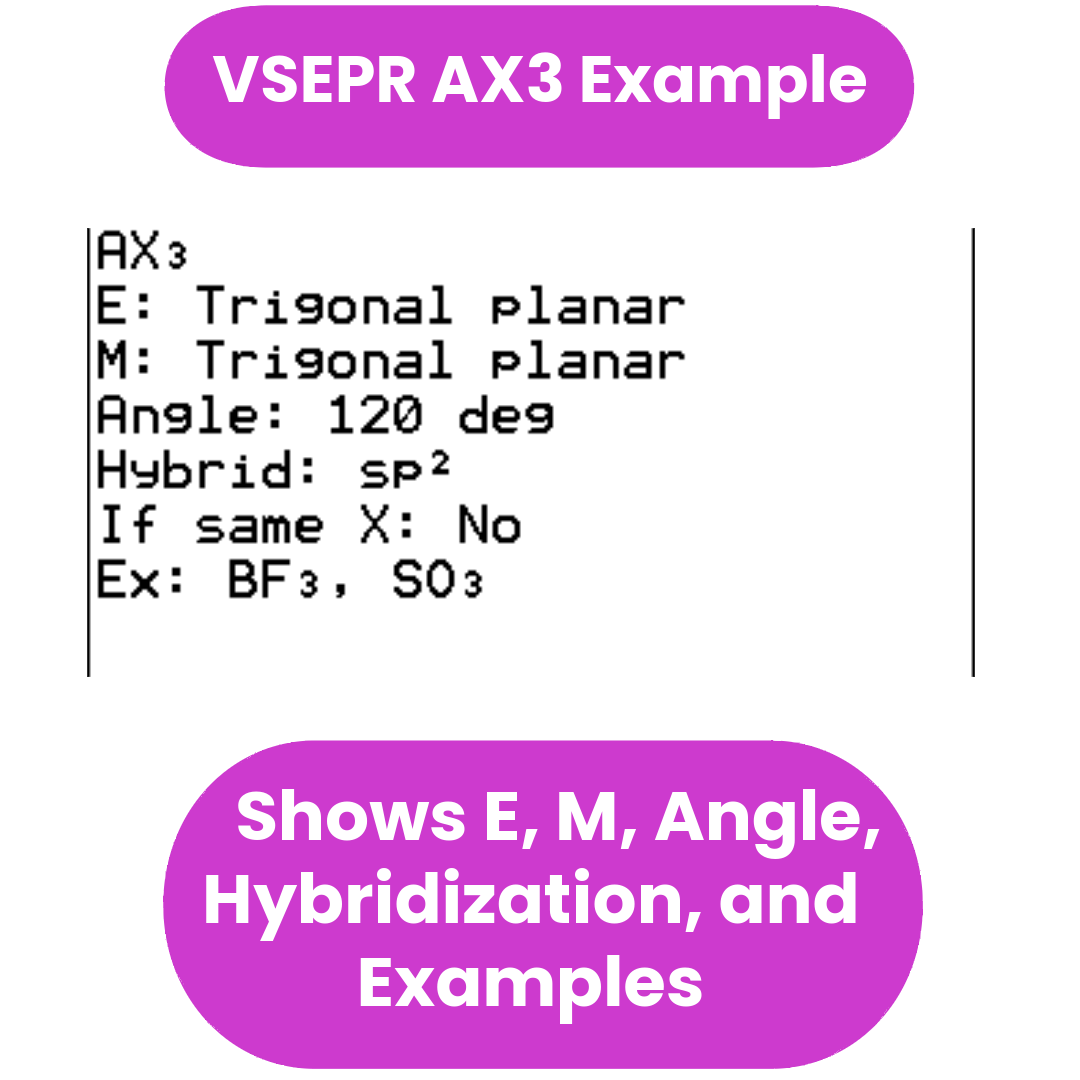
Quickly check electron geometry, molecular geometry, bond angles, hybridization, polarity, and example molecules for common VSEPR shapes directly on your calculator.
Add to Cart — $5.00Compatibility Notice: This is a digital .8xp calculator program for the TI-84 Plus CE and TI-84 Plus CE Python only. It is not compatible with TI-83 models, TI-84 Plus non-CE models, or TI-Nspire calculators. Please confirm compatibility before purchasing. All sales are final for digital downloads.
Video Walkthrough
See the VSEPR Program in Action
This short walkthrough shows the VSEPR Reference Program on the TI-84 Plus CE so you can see how quickly it lets you review common molecular shapes and geometry patterns.
What It Does
A Fast VSEPR Reference You Can Keep on Your Calculator
This program is designed for chemistry students who want a quick way to review VSEPR shapes without flipping through notes, slides, or textbook charts every time.
Instead of trying to remember whether a molecule is linear, bent, trigonal planar, trigonal pyramidal, tetrahedral, trigonal bipyramidal, T-shaped, square pyramidal, square planar, or octahedral, you can pull up the relevant case directly on your TI-84 Plus CE.
Electron & Molecular Geometry
Each case shows both the electron geometry and the molecular geometry, so students can compare them clearly.
Bond Angles
Quick access to ideal and approximate bond angles, including common lone-pair compression patterns.
Hybridization Notes
Includes the usual hybridization labels tied to each geometry for quick review before homework, quizzes, and tests.
Polarity Guidance
Includes short polarity notes to help students check whether a shape is typically polar or nonpolar.
Example Molecules
Many shapes include example molecules so students can connect the notation to actual chemistry problems.
Common + Less Common Cases
Covers 2-domain through 6-domain patterns, including less common cases that may appear in fuller VSEPR charts.
Included Topics
What’s Covered
- 2-domain VSEPR cases
- 3-domain VSEPR cases
- 4-domain VSEPR cases
- 5-domain VSEPR cases
- 6-domain VSEPR cases
- Help menu for VSEPR notation
- Electron geometry
- Molecular geometry
- Bond-angle references
- Hybridization
- Polarity notes
- Example molecules for many common shapes
- Less-common 6-domain cases marked as less common or rare on many intro tests
Shape Coverage
Common Shapes Students Usually Need to Know
The program is built around the shapes chemistry students most often need to recognize quickly in class and on exams.
Helpful for review: This is a reference program, not a solver. It is meant to help you check key VSEPR information faster so you can spend more time actually working the chemistry.
Who It Helps
Built for Chemistry Students Who Want Faster Review
This program is especially useful for students in:
- General Chemistry
- Honors Chemistry
- AP Chemistry
- Introductory college chemistry
It is a good fit if you want:
- less time spent digging through notes
- a quicker way to refresh your memory
- more confidence with VSEPR shapes
- a simple chemistry reference on your calculator
Need help choosing a program? See the AP & General Chemistry Bundle User Guide for a full topic-by-topic breakdown.
Get the Program
Add VSEPR Ref to Your Calculator
Download includes the VSEPR Ref program file and installation guidance for compatible TI-84 Plus CE calculators.
- VSEPR Ref program file (.8xp)
- Reference menus for 2–6 domains
- Electron geometry + molecular geometry
- Bond-angle reference
- Hybridization notes
- Polarity notes and examples
Digital Product Notice: Because this is a digital download, all sales are final. Please make sure your calculator model is compatible before purchasing. If you are new to TI-84 programs, try one of the free programs on the site first to confirm that file transfer works on your setup.
What do I need to install the program?
What do I need to install the program?
- TI84 Plus CE (or Python) Calculator
- TI Connect CE Software
- Update Your TI calculator software
- USB mini to USB cord (Should have came with your calculator, or you can buy one from Staples or Best Buy)
How do I install the program on my calculator?
How do I install the program on my calculator?
Can you help me with the TI connect software?
Can you help me with the TI connect software?
Yes! Take a look at this guide for the TI Connect CE Software for more help.