
How to Fix "Memory Full" on TI-84 Plus CE
How to Fix "Memory Full" on TI-84 Plus CE (ARC vs. RAM)
If you are installing a large program bundle (like the AP Chemistry or STEM Mega Bundle), you may encounter a "Memory Full" or "Insufficient Storage" error.
Don't worry—you don't need to delete your programs. Your calculator has two types of memory: RAM (active workspace) and ARC (storage library). By moving programs to ARC, you can store every program we offer without issue.
Quick Step-by-Step Instructions:
- Press [2nd] then [ + ] (the MEM key).
- Select 2: Mem Management/Delete...
- Select 7: Program...
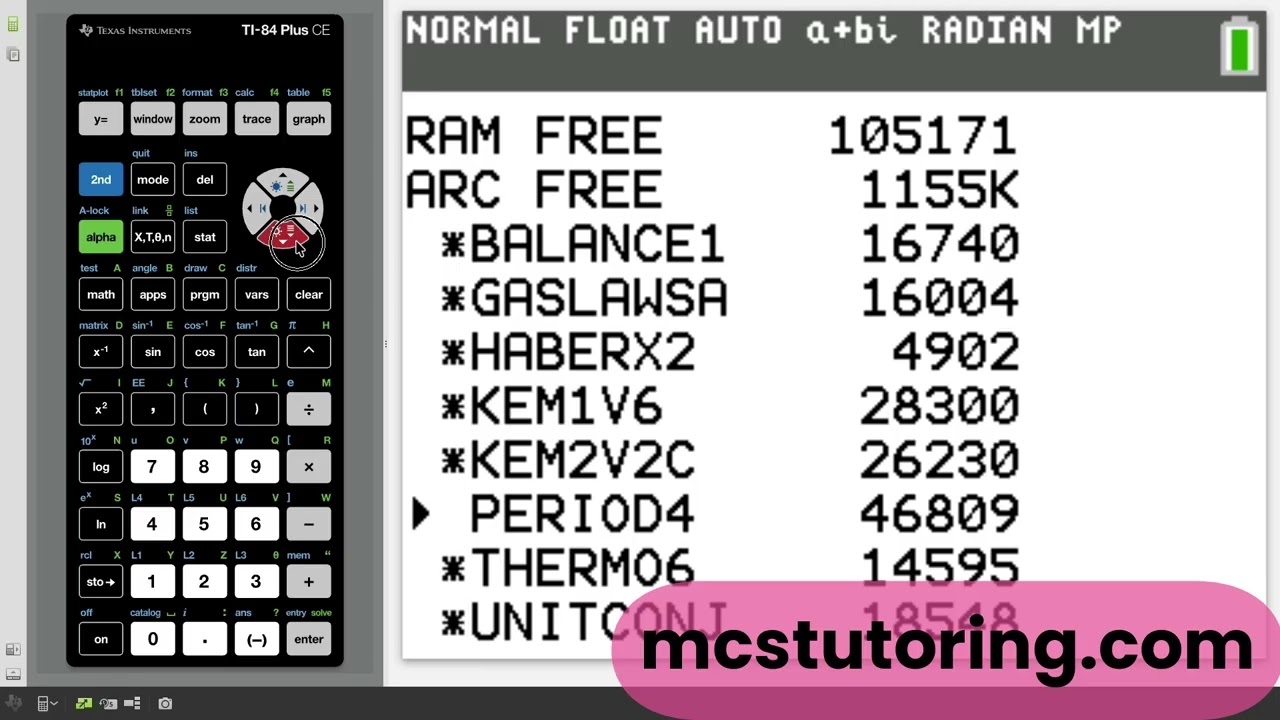
- Scroll to your programs. An asterisk (*) means the program is already in Archive.
- Press [ENTER] on any program to move it to Archive.
Tip: Keep an asterisk next to your programs to keep your RAM free!
Video Tutorial: Free Up TI-84 Storage
Watch this guide to see exactly how to manage your calculator's storage and ensure your programs run perfectly.
Why use ARC memory?
- Massive Space: Archive is nearly 8x larger than RAM.
- Safe Storage: Programs won't be deleted if RAM is cleared or if your batteries die.
- Run from Archive: All programs from mcstutoring.com can run directly from the Archive.