TESTMATH: TI-84 Calculator Programs for the Digital SAT® Exam
TESTMATH: TI-84 Calculator Programs for the Digital SAT® Exam
⚠️ Before You Buy:
• Digital product — No refunds
• Requires TI-84 Plus CE or TI-84 Plus CE Python
• NOT compatible with older TI-84 Plus (black & white screen)
• By purchasing, you confirm you understand this is a digital download and cannot be returned
Couldn't load pickup availability
✅ SAT® Math Practice, Geometry, Triangle & Unit Conversion Tools for the TI-84 Plus CE
A focused TI-84 Plus CE toolkit for SAT® Math preparation. This bundle includes TESTMATH, GEOFIG, TRISOLVE, and UNITCON to help students practice SAT®-style math, check calculations, work with geometry and triangle problems, and handle common unit conversions. The programs are designed to support problem setup, formula use, and numerical calculation while students continue building the math reasoning needed for the SAT® exam.
The included UNITCON Unit Converter helps with common SAT®-style unit conversions, rate problems, angle conversions, decimal-to-fraction checks, and distance-rate-time problems.
Before you buy: These are digital TI-84 Plus CE calculator programs. They are designed for the TI-84 Plus CE, TI-84 Plus CE Python, and TI-84 Plus CE-T Python Edition. They are not intended for TI-Nspire, Casio calculators, TI-84 EVO, or older black-and-white TI-84 models. Please confirm compatibility before purchasing.
What's Included
| File Name | Type | What It Does |
|---|---|---|
| TESTMATH | SAT® Math Practice Program | Main support program for algebra practice, coefficient-based systems, circles, percents, statistics, and exponential functions. Designed to avoid symbolic algebra/CAS-style functionality. |
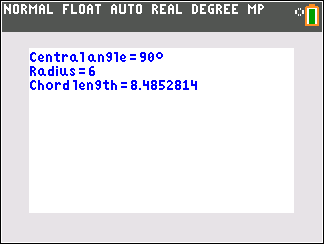
| GEOFIG | Geometry Calculator | 2D and 3D geometry calculator for area, perimeter, surface area, volume, circles, sectors, polygons, prisms, cylinders, cones, spheres, pyramids, and related geometry calculations. |
| TRISOLVE | Triangle Tools / Reference | Triangle tools for right triangles, missing angles, trigonometric ratios, similar triangles, 30-60-90 triangles, 45-45-90 triangles, triangle area, perimeter, equilateral triangles, and triangle concept support. |
| UNITCON | Unit Converter | General-purpose unit converter for length, mass, area, volume, speed, temperature, SI prefixes, rates, angles, time, pressure, decimals to fractions, and distance-rate-time problems. |
Important SAT® Calculator Policy Note
Calculator rules can change, and students should always follow the latest College Board calculator policy and the instructions given by their test center. This bundle is designed to support SAT® Math practice, numerical calculation, geometry review, triangle work, and unit conversion. Before test day, students should review the current official College Board calculator policy and make sure their calculator setup follows those rules.
How this bundle helps:
- ✅ Practice SAT®-style math with calculator-supported tools
- ✅ Reduce arithmetic mistakes on multi-step problems
- ✅ Review formulas and relationships faster
- ✅ Handle geometry, triangle, and unit conversion questions more confidently
- ✅ Use your TI-84 Plus CE as a stronger SAT® Math study tool
What kinds of SAT® Math topics does it support?
| SAT® Math Topic | Helpful Program |
|---|---|
| Circles, radius/diameter relationships, circumference, and area | TESTMATH |
| Percents, percent change, and common word-problem calculations | TESTMATH |
| Mean, median, range, standard deviation, and basic statistics | TESTMATH |
| Exponential growth, function values, and growth/decay interpretation | TESTMATH |
| 2D and 3D geometry | GEOFIG |
| Right triangles, special triangles, trig ratios, and triangle relationships | TRISOLVE |
| Unit conversions, rate problems, and decimal-to-fraction support | UNITCON |
Compatible Calculators
✅ TI-84 Plus CE
✅ TI-84 Plus CE Python
✅ TI-84 Plus CE-T Python Edition
✖ Not for TI-83, TI-Nspire, TI-84 EVO, Casio calculators, or older black-and-white TI-84 models.
Delivery
Instant digital download. You receive all four .8xp files after purchase: TESTMATH, GEOFIG, TRISOLVE, and UNITCON.
Best way to use this bundle
Use the programs while practicing SAT® Math questions so you can check calculations, recognize formulas faster, and build confidence with common problem types. The strongest results come when students use the calculator tools alongside strong math reasoning, not as a replacement for understanding the problem.
Taking AP® exams next?
Once the SAT® is behind you, keep your TI-84 working hard with our full suite of AP® Physics, Chemistry, and Calculus solvers built for AP® exam season practice and review.
Shop AP® Programs →Need help getting started? Complete Install Guide (2026) | Troubleshooting | FAQs
SAT® and AP® are registered trademarks of the College Board, which was not involved in the production of, and does not endorse, this product. Calculator rules may change; students should always follow the latest official calculator policy and test-center instructions.
What do I need to install the program?
What do I need to install the program?
- TI84 Plus CE (or Python) Calculator
- TI Connect CE Software
- Update Your TI calculator software
- USB mini to USB cord (Should have came with your calculator, or you can buy one from Staples or Best Buy)
How do I install the program on my calculator?
How do I install the program on my calculator?
Can you help me with the TI connect software?
Can you help me with the TI connect software?
Yes! Take a look at this guide for the TI Connect CE Software for more help.