Vector Solver Program for TI-84 Plus CE
Vector Solver Program for TI-84 Plus CE
⚠️ Before You Buy:
• Digital product — No refunds
• Requires TI-84 Plus CE or TI-84 Plus CE Python
• NOT compatible with older TI-84 Plus (black & white screen)
• By purchasing, you confirm you understand this is a digital download and cannot be returned
Couldn't load pickup availability
Vector Solver Program for TI-84 Plus CE
VECTOR is a TI-84 Plus CE calculator program that solves common 2D and 3D vector problems — components, addition, subtraction, dot products, cross products, and unit vectors — through a simple, menu-driven interface.
Vector calculations are some of the most error-prone steps in physics and math. A wrong sign, a missed quadrant, or a formula mix-up can throw off an entire problem. VECTOR handles those steps automatically so students can focus on understanding the problem rather than fighting the arithmetic.
Free PDF User Guide
Want to see how the program works before buying, or need help after downloading? The free VECTOR user guide includes a readable PDF, downloadable PDF, and the intro video walkthrough.
What VECTOR Calculates
- 2D and 3D vector components from magnitude and angle
- Magnitude and direction angle from 2D or 3D components
- 2D and 3D vector addition and subtraction — returns components, magnitude, and direction
- 2D and 3D dot products and the angle between two vectors
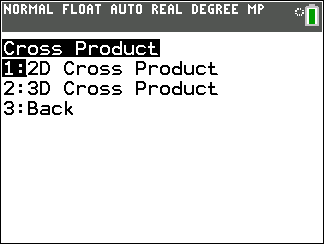
- 2D cross product (scalar z-component with direction) and full 3D cross product vectors
- 2D and 3D unit vectors with built-in verification
- Concept help screens for key vector definitions and angle conventions
Who This Program Is For
VECTOR is designed for students working with vectors in:
- Physics and AP Physics 1
- AP Physics C: Mechanics
- AP Physics C: Electricity & Magnetism
- Precalculus
- Calculus
- Intro college physics and math courses
Program Sections
- Components: Convert between magnitude-and-angle form and x, y, z component form in both 2D and 3D.
- Addition: Add two 2D or 3D vectors. Returns the result vector in component form, magnitude, and direction angle.
- Subtraction: Subtract two 2D or 3D vectors. Returns the same complete result.
- Dot Product: Calculate the scalar dot product of two vectors and find the angle between them.
- Cross Product: Calculate the 2D scalar z-component or the full 3D cross product vector and its magnitude.
- Unit Vector: Convert any 2D or 3D vector into a unit vector. Displays a built-in check confirming the result has magnitude 1.
- Concept Help: Review definitions, formulas, and angle conventions for all major vector operations without leaving the program.
Why VECTOR Saves Time
Many vector problems require several steps in sequence — decomposing a vector, applying a formula, taking a square root, then running an inverse trig function and checking the quadrant. One mistake at any step means starting over. VECTOR runs all of those steps from a single input, so students can verify results quickly and move on.
Example Uses
- Break a force, velocity, or displacement vector into components
- Recover magnitude and direction from known components
- Add or subtract force, field, or velocity vectors
- Use the dot product to find the angle between two vectors
- Find torque direction or magnetic force direction with the cross product
- Generate unit vectors for direction-based calculations
Compatible Calculators
- TI-84 Plus CE
- TI-84 Plus CE Python
- TI-84 Plus CE-T
The downloaded file is: VECTOR.8xp
Before You Buy
- This is a digital download. You will need TI Connect CE software (free from Texas Instruments) to transfer the file to your calculator.
- Calculator program rules vary by teacher, school, and exam. Always follow your instructor's or testing organization's guidelines.
- Because this is a digital product, all sales are final.
What You Receive
- VECTOR.8xp calculator program file
- 2D and 3D component conversion tools
- Vector addition and subtraction tools
- Dot product and cross product tools
- 2D and 3D unit vector tools with built-in verification
- Built-in concept help screens
- Lifetime access to program updates
- Email support for installation and usage questions
AP® is a trademark registered by the College Board, which is not affiliated with and does not endorse this product.
VECTOR gives students a faster, more reliable way to work through 2D and 3D vector calculations on the TI-84 Plus CE.
What do I need to install the program?
What do I need to install the program?
- TI84 Plus CE (or Python) Calculator
- TI Connect CE Software
- Update Your TI calculator software
- USB mini to USB cord (Should have came with your calculator, or you can buy one from Staples or Best Buy)
How do I install the program on my calculator?
How do I install the program on my calculator?
Can you help me with the TI connect software?
Can you help me with the TI connect software?
Yes! Take a look at this guide for the TI Connect CE Software for more help.