ACT Math Program Bundle for TI-84 Plus CE
ACT Math Program Bundle for TI-84 Plus CE
⚠️ Before You Buy:
• Digital product — No refunds
• Requires TI-84 Plus CE or TI-84 Plus CE Python
• NOT compatible with older TI-84 Plus (black & white screen)
• By purchasing, you confirm you understand this is a digital download and cannot be returned
Couldn't load pickup availability
ACT® Math Program Bundle for TI-84 Plus CE
A focused collection of 20 TI-BASIC programs for common ACT® Math calculations involving algebra, functions, sequences, ratios, percentages, statistics, probability, geometry, and trigonometry.
Focused tools for common ACT® Math calculations
This bundle is designed for students who already know the mathematics but want efficient calculator tools available for calculations that can otherwise require several steps or repeated calculator entry.
Instead of one large all-purpose solver, the bundle contains 20 separate, single-purpose programs. You identify the type of problem, select the appropriate program, enter the values from the question, and the program performs its specific calculation.
The programs are intended to support mathematical problem solving—not replace it. Students should practice with the programs before test day so they know which program applies and how to enter the required information.
See the bundle in action
Watch this short introduction to see several of the programs solve representative ACT®-style math calculations and learn how the 20-program bundle is organized.
20 programs included
Each program has one defined mathematical purpose, making it easier to select the appropriate tool for the problem in front of you.
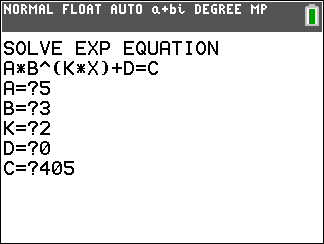
Examples of what the programs can do
Here are several representative calculations from the bundle.
x − y = 1
Free PDF user guide
A detailed free user guide is available with installation help, a Quick Program Finder, examples for all 20 programs, exact inputs and expected answers, troubleshooting, and ACT® calculator-policy considerations. You can view the PDF online or download it for study and practice.
View or download the free ACT® Math TI-84 Plus CE User Guide →
Easy installation with TI Connect™ CE
The bundle is delivered digitally as individual TI-84 program files. Transfer the programs to your calculator using TI Connect CE and a compatible USB cable.
- Download the program files after purchase.
- Connect your TI-84 Plus CE or TI-84 Plus CE Python to your computer.
- Open TI Connect CE.
- Transfer the desired program files to the calculator.
- Press PRGM on the calculator to locate and run a program.
Important ACT® calculator-policy information
These programs have been designed around ACT®'s current requirements for single-purpose mathematics programs. They are written in the calculator's native TI-BASIC language, do not call other programs, do not provide computer algebra system (CAS) functionality, and each is designed to remain within ACT®'s current 25-logical-line limit.
These programs are not described as "ACT® approved." ACT® does not provide a blanket approval of every individual third-party calculator program.
ACT® policies can change. Students are responsible for reviewing the current official ACT® Calculator Policy and CAS Calculator FAQ before test day and ensuring that their calculator and its contents comply with the rules in effect for their test.
Official ACT® resources:
Policy information reviewed August 2026.
Who this bundle is for
Practice selecting and using focused calculator tools before test day.
Add purpose-built numerical tools while continuing to use a familiar calculator.
The included guide explains what every program does and provides a test question for each one.
What these programs do—and what they don't do
- They do: perform specific numerical calculations once you identify the appropriate mathematical method and enter the required values.
- They do: provide focused tools for selected algebra, function, sequence, ratio, percentage, statistics, probability, geometry, and trigonometry calculations.
- They do not: read or interpret ACT® questions for you.
- They do not: automatically determine which program should be used.
- They do not: provide CAS or general symbolic-algebra functionality.
- They do not: replace ACT® Math preparation or mathematical understanding.
ACT® is a registered trademark of ACT, Inc., which is not affiliated with, and does not endorse, this product.
What do I need to install the program?
What do I need to install the program?
- TI84 Plus CE (or Python) Calculator
- TI Connect CE Software
- Update Your TI calculator software
- USB mini to USB cord (Should have came with your calculator, or you can buy one from Staples or Best Buy)
How do I install the program on my calculator?
How do I install the program on my calculator?
Can you help me with the TI connect software?
Can you help me with the TI connect software?
Yes! Take a look at this guide for the TI Connect CE Software for more help.